Multifunction Cheat Menu: Installation and usage
当前版本:0.4.8。 Steam 创意工坊
-
鉴定提示:仅对有可鉴定特性的物品描边。橙色表示发现异常,绿色表示可比对特性未发现异常;无可鉴定特性的物品不描边。绿色不保证正品,不自动鉴定或揭露物品。
-
模组数值: 先拆卸模组,放在店铺、柜台或仓库中。修改性能、效率、品质基础百分比(-99 至 1000),保留随机词条;安装后由游戏计算效果。
-
今晚剩余外出次数 (0–1000): 关店后调整;回店会扣一次,提前关店会重新设为一次。不修改拾荒次数、开放时间或地点解锁。
-
名称跟随游戏语言,保留自定义名称;原生缺失译文时保留原文。
资金与物品生成、耐久、顾客与交易、开局特性、拾荒、次元背包,以及赝品与异常提示。按 F8 使用,菜单跟随游戏语言。
按 F8 打开或关闭,菜单文字、字体和原生物品名称跟随游戏语言。
-
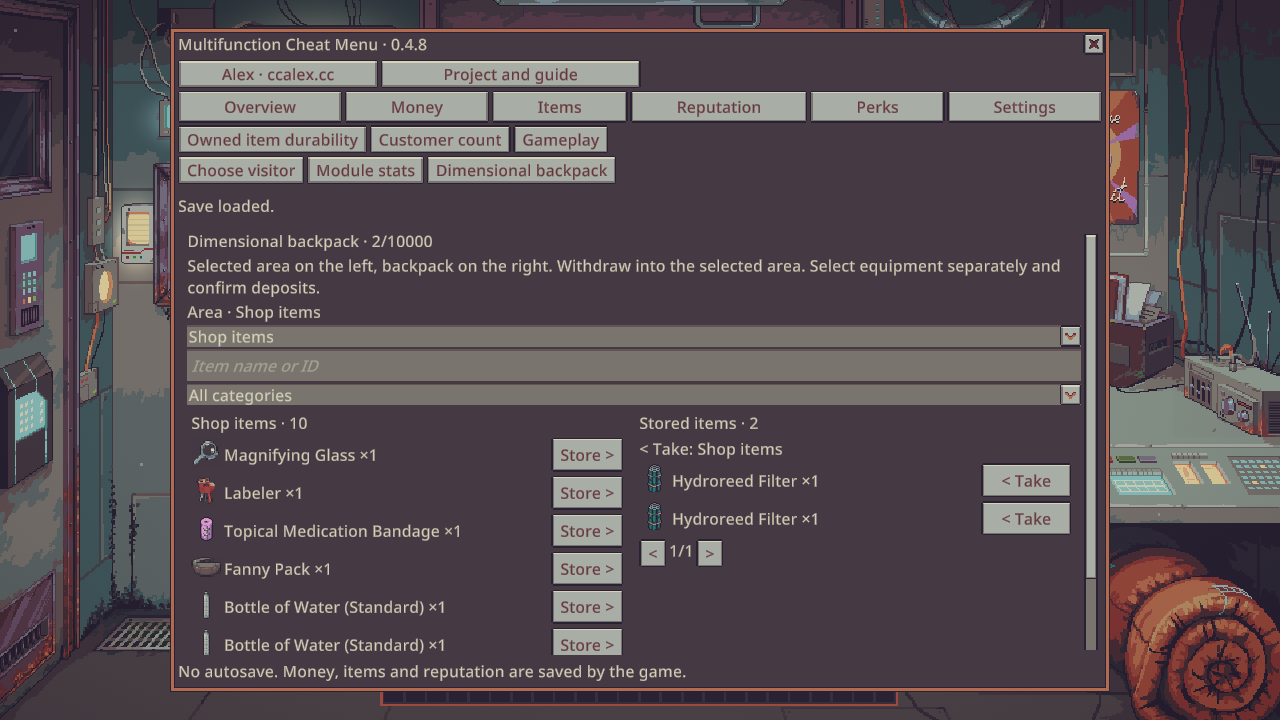
次元背包:左侧手动选分区,右侧显示取回目标。外出默认当地地面、口袋或随身背包;明确选择店铺才访问店铺。取回放入所选分区,不自动改放别处。机器及含机器的容器单独分区,存入需确认。支持图标、搜索、分页与悬浮说明;固定设施不可存入。旧档案箱用“恢复内容”恢复到现有档案箱。目标不可用、放不下或 ID 冲突时保留记录。
-
分类采用游戏交易主类,隐藏当前搜索范围内的空类别。菜单打开时拦截底层鼠标输入,关闭后等待点击释放。
店铺与物品
- 资金:查看、增加、扣减、设置总额;单次变化上限可配置,大额与设置总额需确认。
- 物品:自动读取运行时 ID、名称、分类和正常注册的模组物品;名称/ID 搜索、分类、分页、刷新、单个或批量生成到仓库。满仓停止并报告实际数量。
- 耐久:逐件选择店内自有物品,设置 0 至原生上限,或一键修复。真实与展示耐久同步。
- 无限耐久:阻止店内自有物品的通用耐久消耗,不覆盖枪械、护甲等独立状态。
- 普通顾客数量:下次生成目标 0–100,保留当前队列、剧情顾客和原生筛选规则。
- 阵营声望:从当前存档读取阵营与数值,单项设置 -200~200。
访客、交易与随机结果
- 指定访客:动态读取原生访客池与通缉人物注册表,搜索工厂 ID,确认后安排为下一位。目录不会预先生成全部人物;游戏禁止到访规则仍有效。
- 访客预算:查看并设置当前访客的预算,范围 0~1000000。不使用预算的访客不强行启用预算;确认前换人会取消操作。
- 访客出售物品:在“物品”页选择目录物品,添加 1 单位到当前卖家的柜台,作为非玩家所有的待售货物。不会直接送进玩家仓库。
- 砍价必定成功:普通买入折价与卖出加价使用实际成功分支,原生价格和交易流程仍执行;不包含勒索与威胁。
- 伪装不被识破:保护当前顾客检查的玩家自有出售物品,覆盖普通特征、弹药盒与金属检测判断。不会把假货变真,也不会撤销已揭露的状态。
- 刮刮乐必中奖:开启后,自有未刮卡在打开时获得中奖符号;仍需原生刮开、兑奖。已刮卡不会被重置;不是普通开奖彩票改号。
- 通缉犯提示:普通或隐藏通缉身份出现时显示独立提示,关闭 F8 菜单仍可见;换人后清除,不自动逮捕或举报。
角色、升级与拾荒
- Wild 升级点数:查看并设置 Joe Wild 商店使用的点数,范围 0~1000000,不是阵营声望。
- 一键治疗:清除当前伤势,恢复稳定状态;正常保存后保留。
- 拾荒免伤:阻止拾荒轻伤与重伤判定,不改变其他事件伤害。
- 拾荒物品价值:新拾获物品的基础单价倍率 1~1000,单价最高 1000000。包括该次额外拾获,不重抽掉落,不修改原有库存;最终交易价格仍受游戏规则影响。
次元背包
- 最多 10000 条物品记录,支持名称/ID 搜索、分页、整件存入与取回;实际还受保存数据大小限制。
- 使用原生物品和特征序列化,保存唯一 ID、数量、价值、耐久、真伪等原生状态及容器内容;不按 ID 重新生成基础物品。
- 背包数据属于当前游戏存档,随正常保存、读档一起处理。满仓时取回失败,背包记录保留;同一条记录不能重复取出。
- 卸载前取回物品。停用期间内容保留在存档内,重新启用后可取回;来自其他模组的物品仍需对应模组。
开局特性与参数
- 在原生新游戏特性页操作:动态目录、名称/ID 搜索、原生说明、添加/移除本次选择;保留互斥规则。
- 点数预算 0~1000,基础特性数量 1~100;单项点数消耗 -1000~1000,额外槽位 -100~100。负消耗返还点数,原生继续按钮仍校验最终预算与数量。
- 五项开局效果:储蓄资金 0~1000000;恶劣租约/优质地段租金增量各 0~10000;幸运增量 0~100;不幸增量 -100~100。必须选中对应特性才生效。
- 特性预算、消耗、槽位与效果参数自动保存,重启后恢复;读档不重复发放开局奖励。“恢复特性参数”保存默认值,不回滚已产生的存档结果。
使用与保存
- 在游戏 Mods 页面启用,按提示确认并重启;无需 BepInEx 或修改游戏 DLL。
- 载入存档,按 F8,选择对应页面。特性编辑需先进入“新游戏 → 特性选择”。
- 背包选择存入或取回后确认;指定访客在当前访客离开后到访;访客出售物品从“物品”页添加。
- 快捷键、批量上限与资金变化上限在 Mods 中的模组设置调整。批量上限默认 20,可设 1~100。
修改前备份存档。菜单不自动保存游戏,也没有通用撤销。资金、物品、声望、Wild 点数、伤势和背包随游戏保存;机制开关、无限耐久、顾客目标与拾荒倍率在读档后重置。特性配置独立保存,不给已有存档补发开局奖励。
覆盖游戏全部可选语言,并预置其余资源语言译文。菜单内署名与项目入口由主动点击打开。
截图为隔离测试存档,数值仅用于展示功能。
Current version: 0.4.8. Steam Workshop
-
Appraisal hints: only items with appraisable features receive borders. Orange means a discrepancy; green means no discrepancy in comparable features. Items without appraisal features have no border. Green is not an authenticity guarantee; inspection never reveals or changes features.
-
Module stats: Detach the module into shop storage or a counter. Edit base percentages (-99 to 1000), preserving random effects. The game calculates effects on installation.
-
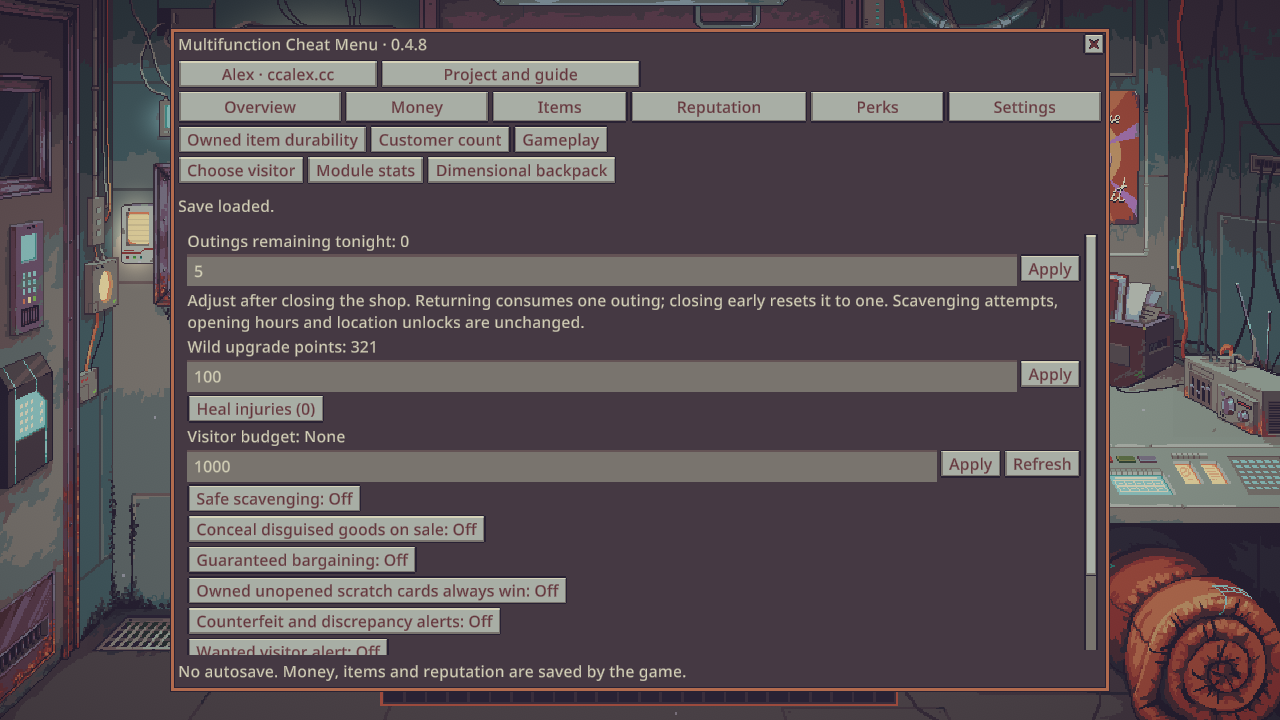
Outings remaining tonight (0–1000): Adjust after closing the shop. Returning consumes one outing; closing early resets it to one. Scavenging attempts, opening hours and location unlocks are unchanged.
-
Names follow the game language; custom names are preserved. Missing native translations retain the original text.
Money, item spawning, durability, customers and trading, starting perks, scavenging, a dimensional backpack, and counterfeit alerts. Press F8; the menu follows the game language.
Press F8 to open or close. Menu text, fonts and native item names follow the game language.
-
Dimensional backpack: select an area on the left; the withdrawal target is shown on the right. Outside, local ground, pockets or the carried bag are the default; shop stock requires explicit selection. Withdraw into the selected area with no automatic fallback. Machines and containers holding machines use separate partitions and deposit confirmation. Icons, search, paging and tooltips are supported. Fixed fixtures cannot be stored. Recover contents restores a legacy dossier into the existing dossier. Unavailable or full destinations and ID conflicts retain the entry.
-
Categories use native market trade labels and hide empty results in the current search. The menu blocks background mouse input until the closing click is released.
Shop and items
- Money: view, add, subtract or set the total. Configurable change limit; large changes and set operations require confirmation.
- Items: runtime IDs, names, categories and registered mod items; name/ID search, filtering, pagination, refresh and batch spawning in storage. Stops at full storage and reports the actual quantity.
- Durability: select individual owned shop items, set standard durability from zero to the native maximum, or repair. Synchronizes real and displayed durability.
- Infinite durability: blocks standard wear on owned shop items, excluding separate gun or armor conditions.
- Normal customers: target 0–100 for the next generation. Keeps the current queue, story visitors and native eligibility rules.
- Reputation: read factions from the save and set one faction to -200–200.
Visitors, trade and random outcomes
- Choose the next visitor from native pools and the wanted-person registry. Search factory IDs; only the selected factory is invoked. Native visitor bans still apply.
- Visitor budget: view and set the current visitor’s budget, 0–1000000. Visitors without budgets are not changed; switching visitors cancels stale edits.
- Visitor merchandise: select an item on the Items page and add one unit to the current seller’s counter as unowned merchandise, ready for the native trade flow.
- Guaranteed bargaining: actual successful branches for purchase discounts and sale markups. Native pricing and trade remain active. Does not include blackmail or threats.
- Conceal disguised goods on sale: protects player-owned goods from the current customer’s feature, ammo-box and ingot-detector checks. Does not make fakes genuine or undo already exposed states.
- Winning scratch cards: owned, unopened cards receive winning symbols when opened. Scratch and redeem through the game; partially scratched cards are not reset. This does not modify draw-based lottery numbers.
- Wanted visitor alert: a separate alert for wanted or secretly wanted visitors remains visible with the main menu closed and clears when the visitor changes. No automatic arrest or report.
Health, upgrades and scavenging
- Joe Wild upgrade points: view and set 0–1000000. Separate from faction reputation.
- Heal injuries: clears current wounds and restores stable health, retained through normal saving.
- Safe scavenging: prevents minor and major scavenging wounds; other event damage remains unchanged.
- Loot value: multiply newly scavenged base unit values by 1–1000, capped at 1000000 per unit. Includes bonus finds, without rerolling or changing existing stock. Native modifiers still affect final trade prices.
Dimensional backpack
- Up to 10000 item records, subject to the save-data size limit; name/ID search, pagination and whole-item deposit/withdrawal.
- Native item and feature serialization preserves identity, quantity, value, durability, disguise states and container contents rather than spawning fresh copies by ID.
- Stored inside the current game save. Full storage leaves the backpack entry intact; consumed entries cannot be withdrawn again.
- Withdraw items before uninstalling. Disabled mods leave backpack data in the save, accessible after re-enabling. Items from other mods still require those mods.
Starting perks
- Edit on the native new-game perk screen: dynamic catalog, native names/descriptions, search and add/remove selections. Incompatibilities remain.
- Point budget 0–1000; base perk count 1–100; per-perk cost -1000–1000; extra slots -100–100. Negative costs refund points; the native Continue button validates the final budget and count.
- Five starting effects: Saving money 0–1000000; Bad Lease and Prime Real Estate rent changes 0–10000 each; Lucky 0–100; Unlucky -100–100. Select the corresponding perk to apply its effect.
- Limits, costs, slots and effect settings persist across restarts. Loading saves never repeats starting rewards. Reset perks saves defaults without undoing existing save changes.
Usage and saving
- Enable in the game’s Mods menu, confirm prompts and restart. No BepInEx or game DLL replacement.
- Load a save and press F8. For perks, first open the native new-game perk selection screen.
- Confirm backpack transfers or the next visitor. Add visitor merchandise from the Items page.
- Change the hotkey, money limit and batch limit in this mod’s settings under Mods. Batch limit defaults to 20 and supports 1–100.
Back up saves before editing. No autosave or general undo. Money, items, reputation, Wild points, health and backpack contents use normal game saving. Gameplay toggles, infinite durability, customer target and loot multiplier reset on load. Perk settings persist separately and never grant starting rewards to existing saves.
All selectable game languages are covered; the remaining resource languages have prepared translations. Author and project links open only when clicked.
Screenshots use an isolated test save; displayed balances demonstrate the interface.