Deep Space Market, Probably a Dream: Installation and usage
当前版本:0.3.10。 Steam 创意工坊
为 Probably Stolen 添加独立虚拟币市场。按 F9、点击可拖动的屏幕终端,或从原版报纸进入财经副刊。原版物品售价不被修改。
- 单笔顾客成交后的物资币和指数报价最多涨跌 10%,不是每日累计限制;普通波动加大,趋势阶段为 22–44 笔。指数按成分币联动,保留 60–160 边界。
行情与历史
- 共 28 个架空行业币,开局显示 12 个,包含不同价格和波动水平;其他币随已接触的内容开放,不提前展示隐藏名称与条件。
- 每笔完整顾客成交推进一次行情,批量成交也只推进一次;币市买卖、存取款、开关菜单不推进价格。
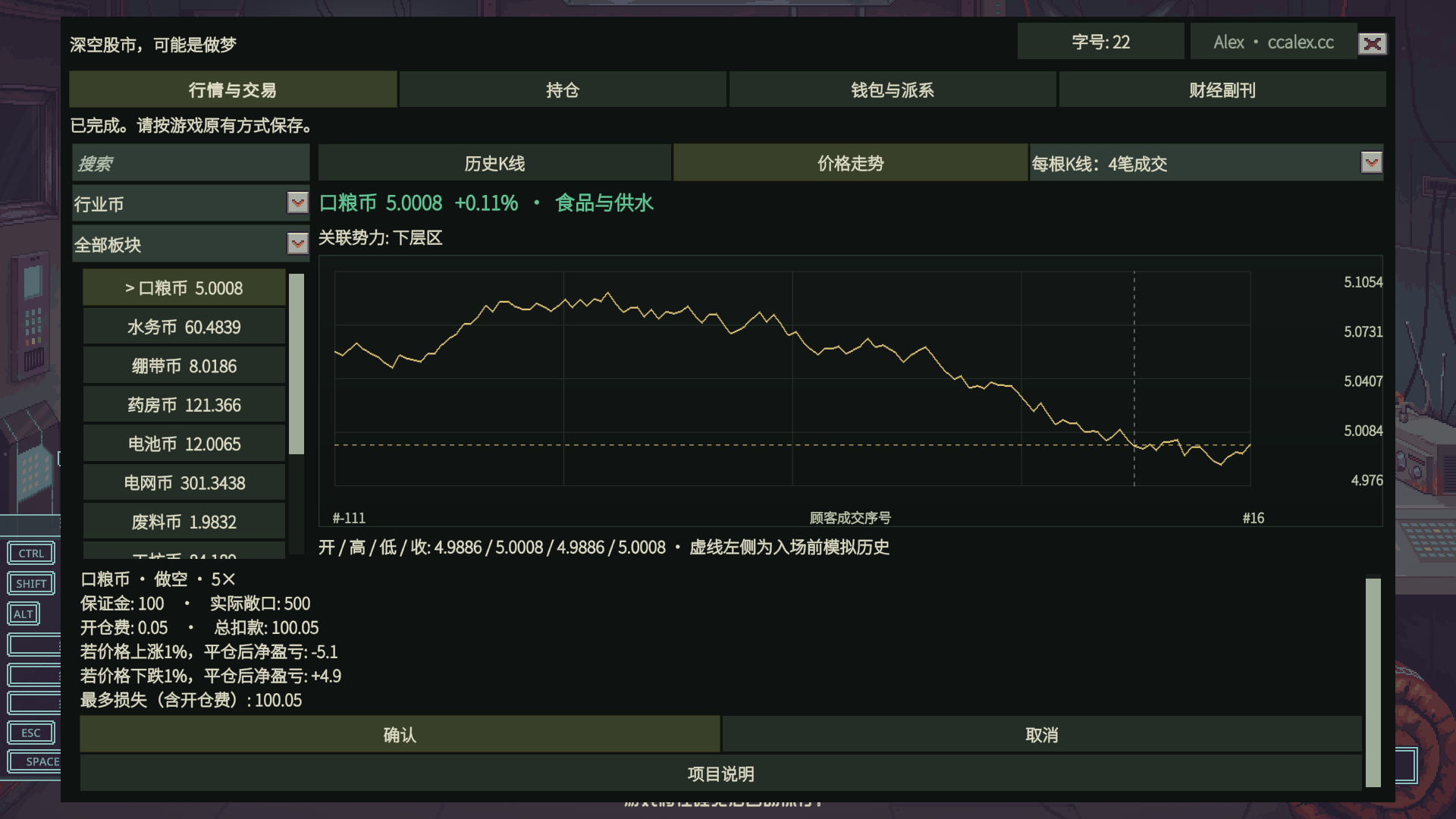
- 首次进入提供模拟历史,图表区分模拟部分与实际记录。历史 K 线、价格走势可切换,每根 K 线可合并 1、4、8、16 笔顾客成交。
- 行情含持续的利好、利空和震荡阶段,以及阶段基准、随机波动和消息影响,不是每次独立抽价。
- 资源收购与出售形成需求/供给压力,数量影响递减并有同日上限,不修改原版商品售价。
- 已实现的支援、举报与声望结果可影响相关资源板块,再传导到势力指数。同日重复行动影响递减;不是所有任务都有专门映射。
现货、指数与分红
- 行业币现货买卖,按名称搜索、行业筛选;显示对应的已知势力。
- 已认识势力显示指数及其资源权重、关系系数。任意非零声望也可识别势力,已认识的势力归零后仍保留。
- 指数由资源币组合推动,从 100 起步,接近 60~160 的边界时放缓;指数只支持现货。
- 分红依据持仓市值:每次顾客成交采样,当日取平均计提;按指数的 3 日或 7 日周期结算到交易钱包。关系与资源景气影响收益。
- 无成交日不计提,跳过日期不补算,临近结算买入不会追领此前分红。页面显示市值、待分红和剩余天数。
持仓与交易操作
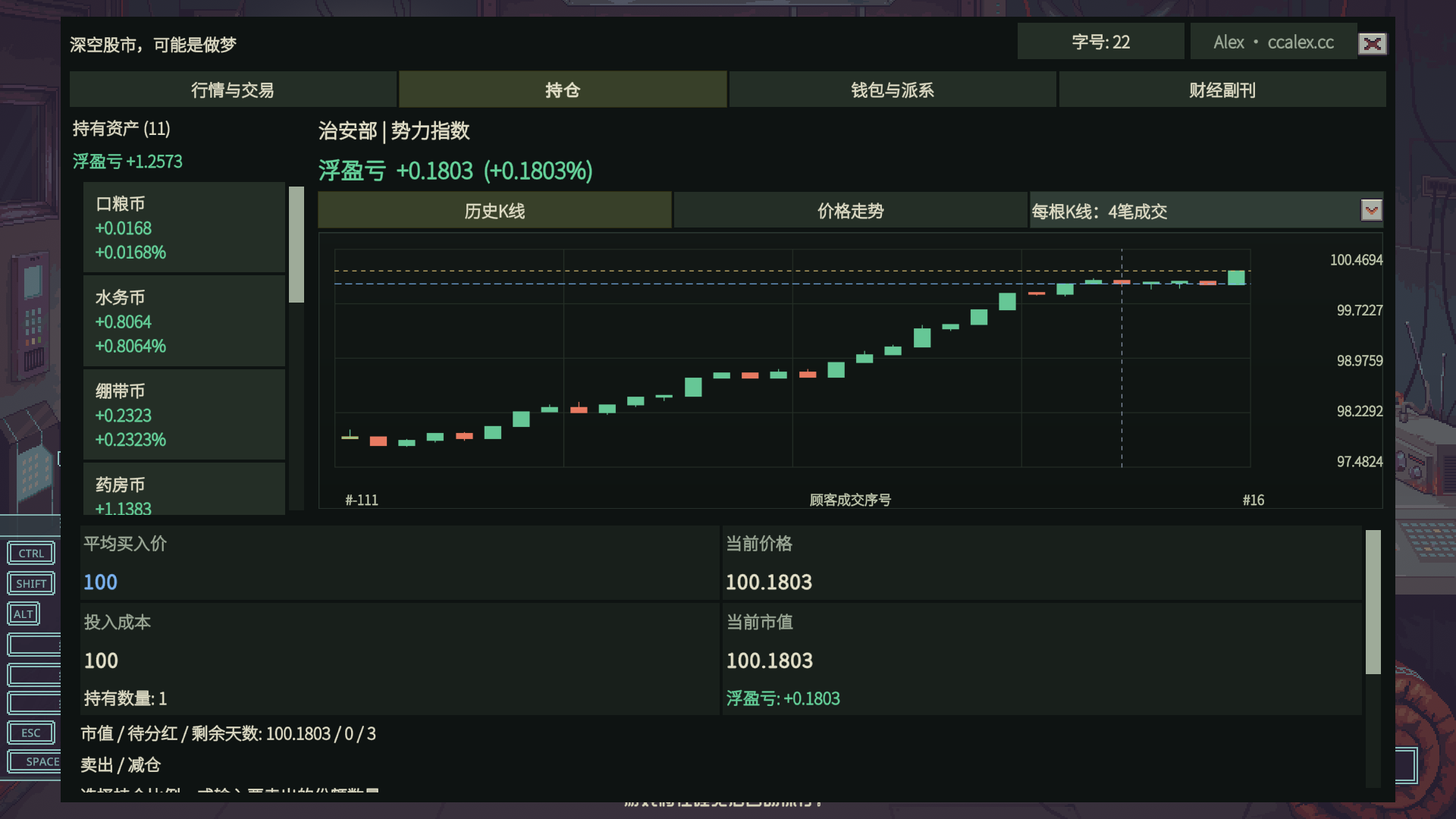
- 行业币、指数、合约统一列入持仓。每项可看 K 线、趋势、平均买入价、当前价格、投入成本、市值、盈亏和收益率;分红单列。
- 多次买入按实际持有数量计算加权均价。盈亏保留正负号,盈利绿色、亏损红色;悬停说明数字含义。现货浮盈亏不含手续费与分红。
- 支持部分卖出或平仓:25%、50%、75%、100%,或手动份额。确认前显示费用、预计到账和剩余数量;全部退出处理精确余量。
- 买入预算含手续费;交易成功后定位到对应持仓。报价变化会要求重新确认,失败不扣款。切换资产和进阶选项保留操作位置。
多空与杠杆
- 行业币支持永续做多/做空,倍率 1、2、5、10、20、30、50 倍,由担保势力声望决定上限。选择势力不会自动借款。
- 选择方向、担保方和杠杆,可按开仓数量或保证金输入,另一项自动换算。确认前显示数量、保证金、敞口、开仓费、总扣款、强平价及涨跌 1% 后的净盈亏;预览不是预测。
- 无到期结算、实物交割或追保。仓位净值耗尽时自动强平,单仓价格损失限于剩余保证金,开仓费不退,不额外扣店铺资金或产生穿仓债务;仍可主动部分或全部平仓。钱包显示最近六条强平记录。旧存档中已经耗尽净值的仓位会在载入时结算。
- 每币最多一仓、总计最多六仓。单仓敞口不超过自有资本,总敞口不超过三倍自有资本,总保证金不超过其 30%;借款不增加风险预算。
- 交易费为名义成交金额的 0.01%,买卖均收取。
钱包与派系借贷
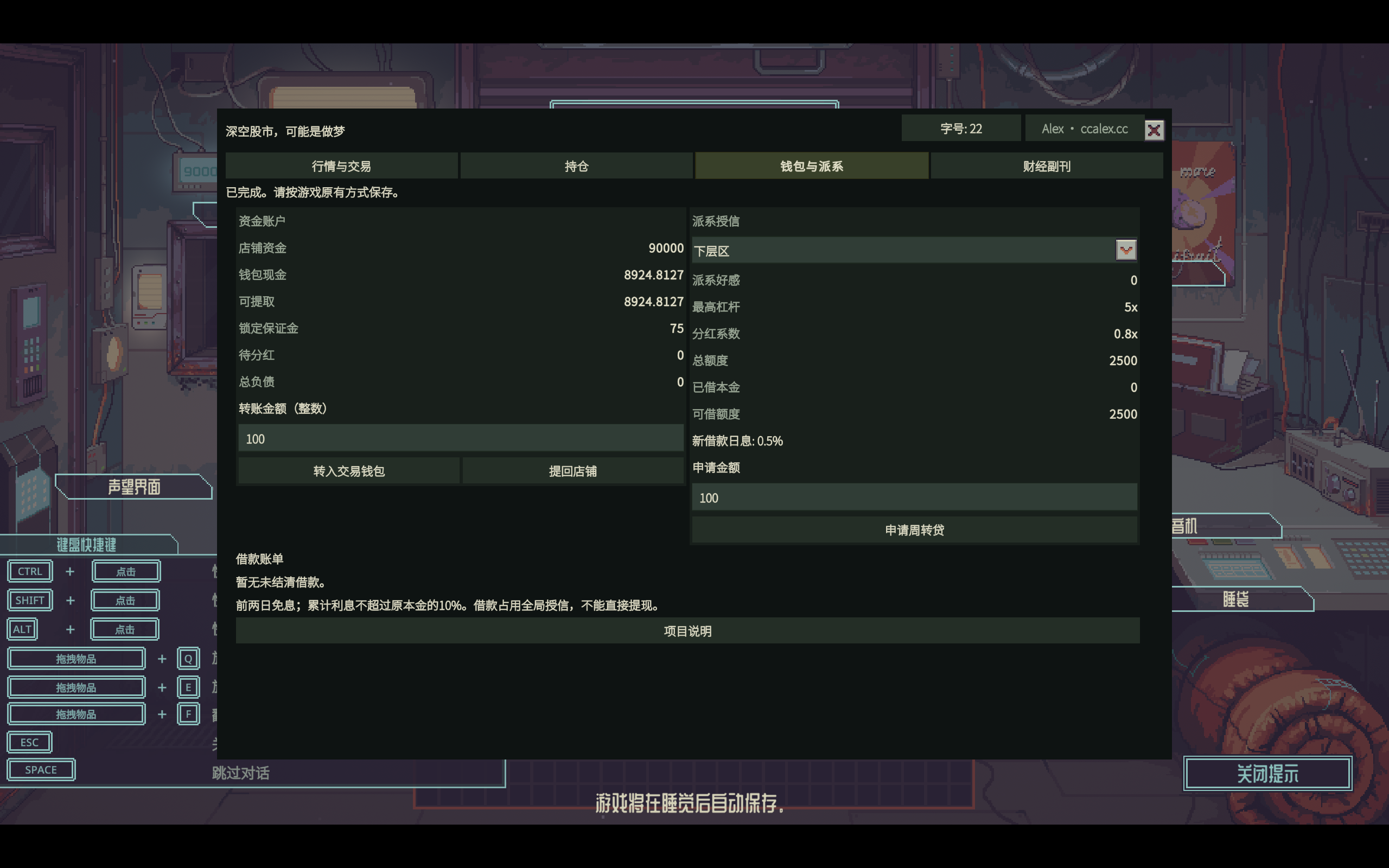
- 店铺资金按整数转入交易钱包,卖出后可将可提现余额转回店铺;借款不能直接提现。
- 声望 0/10/20/30/40/50/75/100/150/200 的单势力额度分别为 2500/3500/5000/6500/8500/10500/15000/20000/30000/40000。档位间线性增长,额度向下取整到 50;负声望无授信,总未还本金上限 50000。
- 新贷款日息随声望从 0.50% 连续降至 0.10%,既有合同利率不变。 前两游戏日免息,之后单利,累计利息最多为原本金 10%。
- 授信页显示声望、倍率上限、已借本金及实际可借额度;账单显示本金、利息、总欠款和签约利率,支持按金额还款或全部还清。
- 不自动扣店铺资金,不自动还贷;之后的声望变化不追改已签贷款利率或持仓倍率。
使用、界面与保存
- 订阅后在原生 Mods 中启用,按提示确认并重启。无需 BepInEx。
- 载入店铺,按 F9 打开,在钱包页转入资金,再选择行业币或势力指数。
- 查看行情和订单后确认。高级多空操作位于进阶交易中。
- 按游戏原有方式保存;模组不会自动保存整个游戏。
终端可拖动并保存位置,不是物品,不能卖掉或收入背包。标题栏可切换 22/26/30 字号;小屏自动改为滚动布局。菜单覆盖游戏的 11 种资源语言,原生势力名称和公开报纸使用游戏文本。
财经副刊展示当前公开新闻、等待生效及最近生效的市场消息,不展示未来剧情。账户、历史报价、周期及随机状态随存档保存;正常读档不会重抽历史。未保存退出或读取旧档会回到对应存档状态。
停用前卖出现货、平仓、还贷、提现并保存。停用不会自动退款,再启用会读取该存档账户。不支持限价单、自动止盈止损或自动还款。测试数据不保证长期收益;使用前备份存档。
截图为隔离测试存档,数值仅用于展示功能。
允许 SL 读档:资金、仓位、行情历史和强平记录一起回到保存时的状态;不增加跨存档惩罚,也不在读档时重新随机。同一状态按相同操作推进得到相同结果。
Current version: 0.3.10. Steam Workshop
An independent virtual-currency market for Probably Stolen. Press F9, click the movable desktop terminal, or open the newspaper finance supplement. Native item prices are unchanged.
- Currency and index quotes may move up to 10% per customer trade, not per day. Ordinary volatility is higher; phases last 22–44 trades. Indices follow their component currencies and retain the 60–160 bounds.
Prices and history
- 28 fictional sector currencies, with 12 initially visible, spanning different prices and volatility. Others appear as relevant content becomes known; hidden names and requirements are not listed.
- Each completed customer trade advances prices once, including bulk trades. Currency orders, transfers and reopening the menu do not advance prices.
- Initial simulated history is distinguished from actual play. Switch between candlesticks and price trends; each candle combines 1, 4, 8 or 16 customer trades.
- Sustained bullish, bearish and sideways phases combine a reference level, noise and news. Prices are not independently rerolled each time.
- Buying and selling resources applies demand/supply pressure, with diminishing volume effects and daily limits. Native item prices stay unchanged.
- Implemented support/report actions and their native reputation outcomes affect related sectors and then indices. Repeated actions have diminishing daily impact. Not every quest has a dedicated market mapping.
Spot, faction indices and dividends
- Buy and sell sector currencies; search names, filter sectors and see known faction links.
- Known factions have indices showing resource weights and relationship factors. Any nonzero reputation also reveals a faction; previously known factions remain after reputation returns to zero.
- Resource baskets drive indices, starting at 100 and slowing near bounds of 60–160. Indices support spot trading only.
- Dividends use held market value, sampled after customer trades and averaged daily. Each index settles every 3 or 7 days into the wallet; relations and resource conditions affect payouts.
- Days without customer trades do not accrue; skipped dates are not backfilled. Last-minute purchases cannot claim earlier dividends. Market value, accrued dividends and days remaining are shown.
Holdings and orders
- Currencies, indices and contracts appear together in holdings, with charts, average entry, current price, cost, value, profit/loss and return. Dividends are separate.
- Repeated purchases use a quantity-weighted average price. Gains are green, losses red, both with signs. Hover explanations clarify the numbers. Spot unrealized P/L excludes fees and dividends.
- Partial sales and contract closes: 25%, 50%, 75%, 100% or a manual quantity. Preview fees, net proceeds and remaining units; full exit clears the exact remainder.
- Purchase budgets include fees. Successful purchases select the holding. Changed quotes require reconfirmation; failed orders leave balances untouched. Asset and advanced-control changes preserve scroll position.
Long, short and leverage
- Perpetual long/short currency contracts at 1, 2, 5, 10, 20, 30 or 50 times leverage, limited by sponsor reputation. Selecting a sponsor does not borrow money.
- Choose direction, sponsor and leverage, then enter opening units or margin; the other value is calculated automatically. Review units, margin, exposure, entry fee, debit, liquidation price and net P/L after a 1% move. Scenarios are not predictions.
- No expiry, physical delivery or margin calls. Contracts liquidate automatically when equity is exhausted. Price losses are limited to remaining margin; entry fees are not refunded. Liquidation does not debit shop cash or create extra debt. Manual partial and full exits remain available. The wallet shows the latest six liquidation records. Already exhausted positions in older saves settle on loading.
- One position per currency, six total. Per-position exposure cannot exceed own capital; total exposure is capped at three times capital and total margin at 30%. Loans do not increase this risk budget.
- Trading fees are 0.01% of nominal traded value on both entry and exit.
Wallet and faction loans
- Transfer whole credits from the shop to the trading wallet and withdraw available proceeds. Borrowed money cannot be withdrawn directly.
- Reputation 0/10/20/30/40/50/75/100/150/200 gives per-faction credit 2500/3500/5000/6500/8500/10500/15000/20000/30000/40000, respectively. Interpolate between tiers and round credit down to 50; negative reputation gives no credit. Total outstanding principal: 50000.
- New-loan daily rates decrease continuously from 0.50% to 0.10% with reputation; existing contracts keep their rates. First two game days are interest-free, then simple interest; lifetime interest is capped at 10% of original principal.
- View reputation, leverage limits, borrowed principal and available credit. Bills show principal, interest, total debt and contracted rate; repay an amount or the entire debt.
- No automatic shop debit or repayment. Later reputation changes do not rewrite existing loan rates or position leverage.
Use, interface and saves
- Subscribe, enable in native Mods, confirm prompts and restart. No BepInEx required.
- Load the shop, press F9, deposit through Wallet, then select a currency or faction index.
- Review and confirm orders. Long/short controls are under Advanced trading.
- Save through the game normally; the mod does not autosave the whole game.
The terminal can be dragged and remembers its position. It is not an item and cannot be sold or stored. Choose 22/26/30 text size; small screens use scrolling layouts. Menu translations cover all 11 game resource languages; native faction names and published newspaper text follow the game.
The finance supplement shows public news plus pending and recently applied market events, not future story content. Account data, history, phases and random state persist with the save. Loading does not reroll history; unsaved play or older saves revert to their saved state.
Before disabling, sell holdings, close contracts, repay debts, withdraw and save. Disabling does not refund balances; re-enabling restores that save’s account. No limit orders, automatic profit/loss exits or automatic repayment. Testing does not guarantee long-term returns. Back up saves first.
Screenshots use an isolated test save; displayed balances demonstrate the interface.
Save/load (SL) is allowed: funds, positions, market history and liquidation records return to their saved state. There is no cross-save penalty or reroll on loading. Identical actions from the same state produce identical results.